If your website is growing, you may eventually reach a point where ordinary shared hosting no longer feels like enough.
Maybe your traffic is increasing. Maybe you’re running an online store. Maybe you’re managing several websites. Or perhaps you’re seeing your hosting resources get used up more frequently.
That’s when cloud hosting becomes worth looking at.
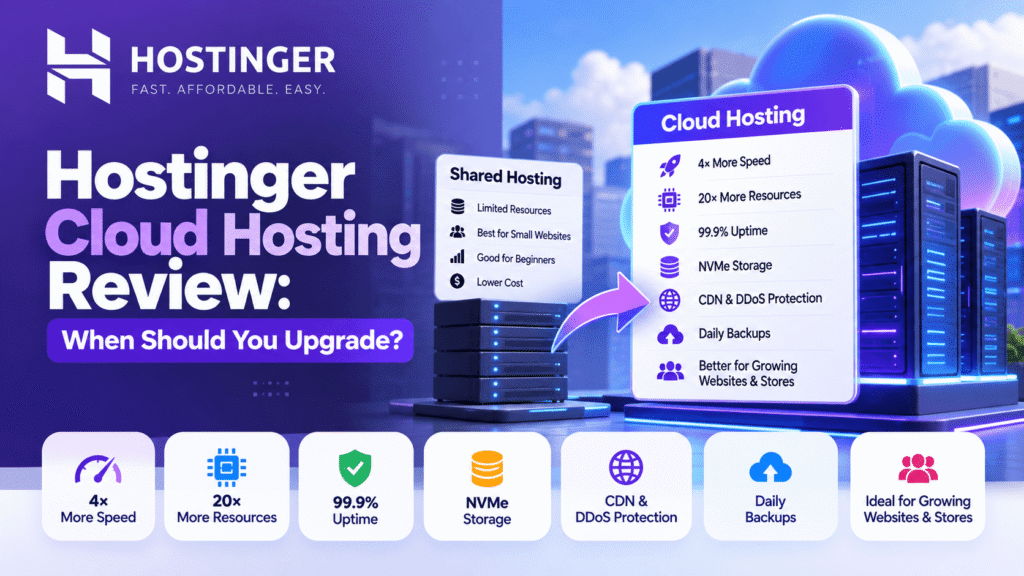
Hostinger cloud hosting is positioned by Hostinger as a managed hosting option for growing websites and ecommerce projects that need more speed and resources without the complexity of managing a server yourself. The current India cloud hosting page advertises 4× more speed, 20× more resources than traditional web hosting, 99.9% uptime, daily backups and DDoS protection. These performance figures are Hostinger’s own product claims, not independent benchmarks.
But that doesn’t mean everyone should upgrade to cloud hosting.
If you’re running a small blog or a basic business website with steady traffic, shared hosting may still be perfectly adequate.
So the real question is:
When should you actually upgrade?
Let’s look at the current Hostinger cloud plans, what they include, and the situations where paying more for cloud hosting starts to make sense.
If your website has outgrown shared hosting, you can check the current Hostinger cloud plans here:
What Is Hostinger Cloud Hosting?
Cloud hosting runs websites across a network of connected virtual servers rather than relying on a single physical machine.
According to Hostinger, this setup is designed to provide stronger uptime and scalability than shared hosting. The company describes its cloud hosting as fully managed, meaning you get additional resources without having to manage the server yourself.
That’s an important distinction.
A VPS can give you much more control, but you may need more technical knowledge to manage it.
Cloud hosting sits somewhere between simple shared hosting and a fully self-managed VPS in terms of the type of user it is aimed at.
Hostinger currently describes its three main hosting categories this way:
- Shared hosting: first websites, blogs and small business sites with steady traffic
- Cloud hosting: growing websites and stores that need more speed, resources and reliability
- VPS hosting: projects that need more control and flexibility
That makes cloud hosting particularly relevant when your website has outgrown the requirements of a basic hosting plan.
Hostinger Cloud Hosting Plans and Pricing
As of September 2026, Hostinger’s India cloud hosting page lists three plans:
| Plan | Promotional price* | Regular displayed price | Renewal |
|---|---|---|---|
| Cloud Startup | ₹599/month | ₹1,699/month | ₹1,599/month |
| Cloud Professional | ₹899/month | ₹3,499/month | ₹3,299/month |
| Cloud Enterprise | ₹1,899/month | — | — |
*The ₹599, ₹899 and ₹1,899 monthly prices are based on Hostinger’s 48-month plans, paid upfront. Applicable taxes are extra. Hostinger’s current cloud page confirms these promotional prices.
The pricing is important because the promotional rate shouldn’t be confused with the amount you’ll pay when the introductory term ends.
For example, Cloud Startup currently renews at ₹1,599/month, according to Hostinger’s current pricing information.
So when comparing hosting, always consider both:
Initial price + renewal price
rather than looking only at the advertised promotional rate.
Our Hostinger pricing 2026 article covers this broader pricing issue in more detail.
What’s Included in Hostinger Cloud Startup?
The Cloud Startup plan is currently the entry point to Hostinger’s cloud hosting range.
Hostinger lists these resources on the current India cloud page:
- 4 CPU cores
- 4 GB RAM
- 100 GB NVMe storage
- 2,000,000 inodes
- 100 PHP workers
- Unlimited websites
- 10 Web Apps
- Dedicated IP
- Daily backups
- DDoS protection
- Free website migration
- Free domain for one year
- Unlimited free SSL
- CDN
- 30-day money-back guarantee
- 24/7 customer support
Hostinger also lists managed WordPress capabilities and other performance features across its cloud hosting offering, including WordPress acceleration, Object Cache and staging tools.
That’s a significant step up from what you’d normally expect from an entry-level shared hosting environment.
What Does 20× More Resources Mean?
This is one of the claims you’ll notice prominently on the Hostinger page.
Hostinger says its cloud hosting provides 20× more resources than traditional web hosting. It also advertises 4× more speed.
It’s important to understand what that means.
This isn’t the same thing as saying:
Every website will load 4× faster.
Actual website speed depends on many factors, including:
- Website code
- WordPress plugins
- Theme
- Images
- Database queries
- Caching
- CDN configuration
- Third-party scripts
- Traffic levels
- Server resources
So I would treat the 4× speed and 20× resource figures as Hostinger’s advertised product claims, rather than guaranteed results for every website.
The more practical takeaway is that cloud hosting gives you substantially more allocated resources than a basic shared hosting environment.
Hostinger Cloud Hosting vs Shared Hosting
This is probably the comparison most people need before upgrading.
Shared hosting is designed to keep things simple and affordable.
Hostinger currently describes its shared hosting as suitable for first websites, blogs and small businesses with steady traffic.
Cloud hosting is aimed more at growing websites and stores.
| Feature | Shared Hosting | Cloud Hosting |
|---|---|---|
| Management | Managed | Managed |
| Target user | Beginners and small websites | Growing websites and stores |
| Resources | Lower | Higher |
| Scalability | More limited | Designed for growth |
| Dedicated IP | Not generally the focus | Included |
| Daily backups | Depends on plan | Included |
| DDoS protection | Available as part of Hostinger security | Included |
| Multiple websites | Depends on plan | Unlimited on current cloud plans |
| Technical difficulty | Low | Low |
| Root access | No | No |
| Best for | Blogs, small business sites | Growing websites, stores, agencies |
The important point is that cloud hosting isn’t automatically necessary just because it is more powerful.
If your current hosting is handling your website comfortably, moving to a more expensive plan may not provide much practical benefit.
When Should You Upgrade to Hostinger Cloud Hosting?
This is where the decision becomes much more useful.
There are several situations where an upgrade starts making sense.
1. Your Website Is Consistently Using High Resources
Hostinger’s dashboard provides a Resources Usage section where you can monitor CPU, RAM, disk and other resource consumption.
If you’re repeatedly hitting resource limits, don’t immediately assume you need a bigger plan.
First find out what’s causing the usage.
It could be:
- A poorly optimized plugin
- Excessive background processes
- Large images
- High database activity
- Sudden traffic
- Poor caching
- Bots or unwanted traffic
- An inefficient website configuration
But if you’ve optimized the website and resource usage remains consistently high, that’s a stronger reason to consider Hostinger cloud hosting.
2. Your Website Traffic Is Growing
A small website with a few hundred visitors doesn’t require the same resources as a website receiving tens of thousands of visits.
And traffic isn’t always predictable.
You may have:
- A successful social media campaign
- A viral blog post
- A large advertising campaign
- A seasonal sale
- A product launch
- A successful email campaign
Hostinger specifically positions cloud hosting for growing sites and says it is designed to handle traffic spikes.
If traffic is consistently growing, additional hosting resources can give your website more room to handle that growth.
3. You’re Running an Ecommerce Website
An ecommerce website usually does considerably more work than a basic informational website.
A store may have to process:
- Product searches
- Product filters
- Shopping carts
- Customer accounts
- Checkout
- Orders
- Payment requests
- Inventory
- Database queries
- Marketing integrations
Hostinger specifically describes Cloud Startup as optimized for business and ecommerce websites.
So if your WooCommerce or other ecommerce website is growing, cloud hosting becomes more relevant.
4. You’re Running Multiple Websites
Another reason to consider an upgrade is the number of websites you’re managing.
The current Hostinger cloud plans support unlimited websites, subject to Hostinger’s Fair Usage Policy.
This can be useful for:
- Agencies
- Freelancers
- Digital marketers
- Web developers
- Small businesses with multiple brands
- Website portfolio owners
Hostinger also highlights agency-oriented features such as access sharing, custom tags and team collaboration through hPanel.
If you’re managing several active client websites, those features can be more useful than simply having additional storage.
Hostinger Cloud Hosting for Agencies
If you’re an agency managing client websites, cloud hosting can be interesting for another reason.
Hostinger’s current cloud hosting page specifically discusses agency use and highlights tools for managing client accounts.
Through hPanel, Hostinger says you can:
- Access client accounts
- Organize websites with custom tags
- Invite team members
- Collaborate on projects
- Monitor website security
- Monitor performance
This doesn’t mean cloud hosting is automatically the right choice for every agency.
But if you’re managing multiple websites, having them under a managed environment can simplify administration.
Hostinger Cloud Hosting for WordPress
You don’t need cloud hosting simply because you use WordPress.
That’s an important distinction.
A normal WordPress blog or small business website can work perfectly well on shared hosting.
Cloud hosting becomes more interesting when the WordPress website has:
- Higher traffic
- More plugins
- WooCommerce
- More database activity
- Multiple websites
- Resource-heavy functionality
- Important business operations
Hostinger currently lists managed WordPress hosting, WordPress acceleration, Object Cache and staging tools as part of its cloud hosting offering.
If you’re specifically evaluating WordPress hosting, our Hostinger WordPress hosting article goes into more detail.
You Don’t Always Need to Upgrade Immediately
Here’s something worth knowing before you spend more money.
Hostinger currently provides a Boost performance option that can temporarily increase your plan’s capacity for 24 hours. The company says this can be useful for temporary traffic increases, large data imports, major website updates or testing a higher hosting plan.
For Cloud Startup, Cloud Professional and Cloud Enterprise, Hostinger also offers paid boosts for longer periods, including 7-day and 30-day options.
This can be useful if you have a temporary event.
For example, imagine you’re running a Meta Ads campaign for a week.
You may not need to permanently upgrade your hosting if the higher traffic is only temporary.
On the other hand, if your website regularly needs more resources, a permanent upgrade makes more sense.
What Happens When You Upgrade?
If you decide to move from web hosting to cloud hosting, Hostinger says the upgrade automatically transfers your:
- Files
- Emails
- Databases
- Configurations
You don’t normally have to manually rebuild the website.
There is one important detail.
When upgrading from web hosting to cloud hosting, Hostinger says you’ll receive a new IP address.
That means you may need to update:
- FTP connections
- Remote database connections
- A records
- Other services that rely on the old IP address
Hostinger says the upgrade can take a few hours, while DNS changes may take up to 24 hours to propagate.
So don’t schedule a major campaign or product launch at the exact moment you’re performing the upgrade.
Hostinger Cloud Hosting vs VPS
Cloud hosting and VPS hosting aren’t the same thing.
Hostinger currently describes VPS hosting as being for projects that need full control and flexibility, while cloud hosting is positioned as a managed option for growing websites and stores.
A simple way to look at it:
Choose cloud hosting when:
You want more resources but don’t want to manage the server yourself.
Consider VPS when:
You need much more control over the server environment and are comfortable handling the additional technical responsibility.
We’ll cover this comparison separately in the upcoming Hostinger VPS vs Shared Hosting: Which One Do You Need? article.
That article can then go deeper into control, server management, resources and technical requirements.
Hostinger Cloud Hosting: Pros and Cons
Pros
- More resources than traditional shared hosting
- Fully managed environment
- Unlimited websites on current cloud plans
- NVMe storage
- Dedicated IP
- Daily backups
- DDoS protection
- Free migration
- CDN
- WordPress tools
- Staging
- Object Cache
- 24/7 support
- Temporary resource boosting
- Suitable for growing ecommerce websites
- Agency management features
Hostinger also currently provides a 30-day money-back guarantee on its cloud hosting plans.
Cons
- More expensive than shared hosting
- Promotional prices require a 48-month commitment
- Renewal prices are substantially higher
- Many small websites won’t need the additional resources
- VPS may be more appropriate if you need full server control
- More resources won’t automatically fix a poorly optimized website
Is Hostinger Cloud Hosting Worth It?
That depends largely on where your website is today.
If you have a small blog with modest traffic and your current hosting is working normally, there’s little reason to upgrade just for the sake of having more resources.
But if you’re consistently hitting resource limits, running an ecommerce store, managing multiple websites or preparing for significant traffic growth, Hostinger cloud hosting becomes a more relevant option.
The current Cloud Startup plan provides 4 CPU cores, 4 GB RAM, 100 GB NVMe storage, 100 PHP workers and 2 million inodes, along with unlimited websites, daily backups, a dedicated IP and other managed hosting features.
The key is to look at your actual requirements rather than the biggest plan available.
Which Hostinger Cloud Plan Should You Choose?
Hostinger currently offers three cloud tiers:
Cloud Startup
The entry-level cloud option.
The current plan provides 4 CPU cores, 4 GB RAM and 100 GB NVMe storage. Hostinger positions it for business and ecommerce websites.
Cloud Professional
The next step is aimed at scaling professional websites.
Hostinger currently lists 5 CPU cores, 6 GB RAM and 200 GB NVMe storage for this tier.
Cloud Enterprise
This is the highest of the three standard cloud tiers and is intended for projects that require substantially more resources.
Rather than choosing it simply because it has the highest specifications, look at your actual resource usage and business requirements before upgrading.
For most websites moving from shared hosting, the first question is whether Cloud Startup provides enough additional capacity. You can then move upward if your requirements justify it.
A Simple Way to Decide
Use this checklist before upgrading.
Stay with shared hosting if:
- Your website is stable
- Traffic is relatively low
- Resource usage is comfortable
- You aren’t experiencing frequent resource limitations
- You’re running a basic blog
- You’re running a small business website
Consider Cloud Startup if:
- Your website is growing
- Resource usage is frequently high
- You’re running a growing ecommerce store
- You’re managing several websites
- You expect traffic spikes
- You want more resources without managing a VPS
Consider higher cloud tiers if:
- Cloud Startup resources are consistently insufficient
- Your website has significantly higher workloads
- You’re managing a large number of active projects
- Your business depends heavily on website availability and performance
Final Thoughts
Hostinger cloud hosting isn’t something every website needs from day one.
For a new blog, portfolio or small business website, shared hosting may be enough.
But websites don’t stay small forever.
As traffic, customers, products, content and applications increase, hosting requirements can change.
The good thing is that you don’t necessarily have to predict that growth years in advance.
You can start with a smaller hosting plan, monitor your resource usage and upgrade when your website actually needs more capacity.
Hostinger’s current cloud plans provide substantially more resources than its traditional web hosting options, while keeping the environment managed. The company also provides temporary resource boosts, making it possible to handle some short-term increases without immediately committing to a permanent upgrade.
So the better question isn’t:
“Is cloud hosting better?”
It’s:
“Has my website reached the point where it needs cloud hosting?”
If the answer is yes, that’s when an upgrade starts making sense.
Frequently Asked Questions
What is Hostinger cloud hosting?
Hostinger cloud hosting is a managed hosting service that runs websites across a network of connected virtual servers. Hostinger positions it for growing websites and stores that need more resources and scalability than traditional shared hosting.
How much does Hostinger cloud hosting cost in India?
Hostinger currently advertises Cloud Startup at ₹599/month, Cloud Professional at ₹899/month and Cloud Enterprise at ₹1,899/month on its 48-month plans. These plans are paid upfront and applicable taxes are additional.
What is the Hostinger Cloud Startup renewal price?
Hostinger currently lists Cloud Startup with a renewal price of ₹1,599/month. Promotional and renewal pricing can change, so check the current pricing page before purchasing.
Is cloud hosting better than shared hosting?
They are designed for different requirements. Hostinger positions shared hosting for first websites, blogs and small businesses with steady traffic, while cloud hosting is aimed at growing websites and stores that need more resources and scalability.
Do I need cloud hosting for WordPress?
No. A small WordPress website can work perfectly well on shared hosting. Cloud hosting becomes more useful as traffic, resource usage, ecommerce activity or website complexity increases.
Can I upgrade from shared hosting to cloud hosting?
Yes. Hostinger says you can upgrade from web hosting to cloud hosting, with files, emails, databases and configurations transferred automatically. A move from web hosting to cloud also gives you a new IP address.
Can I temporarily increase my hosting resources?
Yes. Hostinger currently offers a 24-hour free resource boost for eligible plans. Paid boosts are also available for Cloud Startup, Cloud Professional and Cloud Enterprise for longer periods.
Is Hostinger cloud hosting suitable for ecommerce?
Hostinger specifically describes Cloud Startup as optimized for business and ecommerce websites.
Is Hostinger cloud hosting managed?
Yes. Hostinger describes its cloud hosting as fully managed, so you get additional resources without having to manage the server yourself.
If your website has outgrown shared hosting, you can check the current Hostinger cloud plans here:
Affiliate Disclosure
This article contains affiliate links. If you purchase through one of our links, SuperBuzz Media may earn a commission at no additional cost to you. We only recommend tools that are relevant to our readers.