If you’re looking for an email marketing platform that can help you build a subscriber list, create professional emails, automate follow-ups, build landing pages, and sell products, AWeber deserves a closer look.
But AWeber has changed quite a bit over the years. It is no longer just a traditional newsletter tool. Its current feature set includes AI writing tools, Canva integration, behavioral automation, dynamic content, web push notifications, ecommerce, advanced analytics, and even tools for managing email marketing through AI assistants.
So where does AWeber fit in today?
In this AWeber review 2026, we’ll look at its current features, pricing, automation, AI capabilities, ecommerce tools, landing pages, integrations, pros and cons, and who it makes the most sense for.
The goal is simple: give you enough information to decide whether AWeber deserves a place in your marketing stack.
So, What Is AWeber Actually Built For?
AWeber is an email marketing platform built primarily for businesses, creators, consultants, ecommerce sellers, newsletter publishers, and other users who want to build an audience and communicate with subscribers.
The basic idea is straightforward:
Traffic → Signup → Email → Automation → Customer
You can collect subscribers through signup forms and landing pages, send newsletters, create automated sequences, segment your audience, track performance, and connect AWeber with other tools.
That makes it useful for both simple newsletters and more structured lead-nurturing campaigns.
One thing that becomes clear in this AWeber review 2026 is that the platform has moved well beyond basic email broadcasting.
AWeber is built for emailing people who have subscribed to your list. If you want to contact new B2B prospects with cold email instead, you need a different kind of tool. See our Snov.io pricing breakdown for what that costs.
What Has Actually Changed Inside AWeber?
The biggest surprise for someone who hasn’t looked at AWeber recently is the number of newer features surrounding its core email marketing tools.
AWeber now highlights Canva integration, Theme Settings, Smart Designer, AI Subject Line Assistant, AI Writing Assistant, Newsletter Assistant, mobile editing, link previews, RSS-triggered emails, behavioral automation, dynamic content, tagging, segmentation, ecommerce, web push notifications, and more.
It also supports integrations with WordPress, Shopify, WooCommerce, Facebook, PayPal, Zapier, and hundreds of other apps.
In other words, AWeber is trying to make the entire email marketing workflow easier rather than simply giving you a box for writing newsletters.
That broader approach is one of the most important things to understand in this AWeber review 2026.
Can You Create Professional Emails Without Being a Designer?
Yes, and this is one of the areas where AWeber has added several useful features.
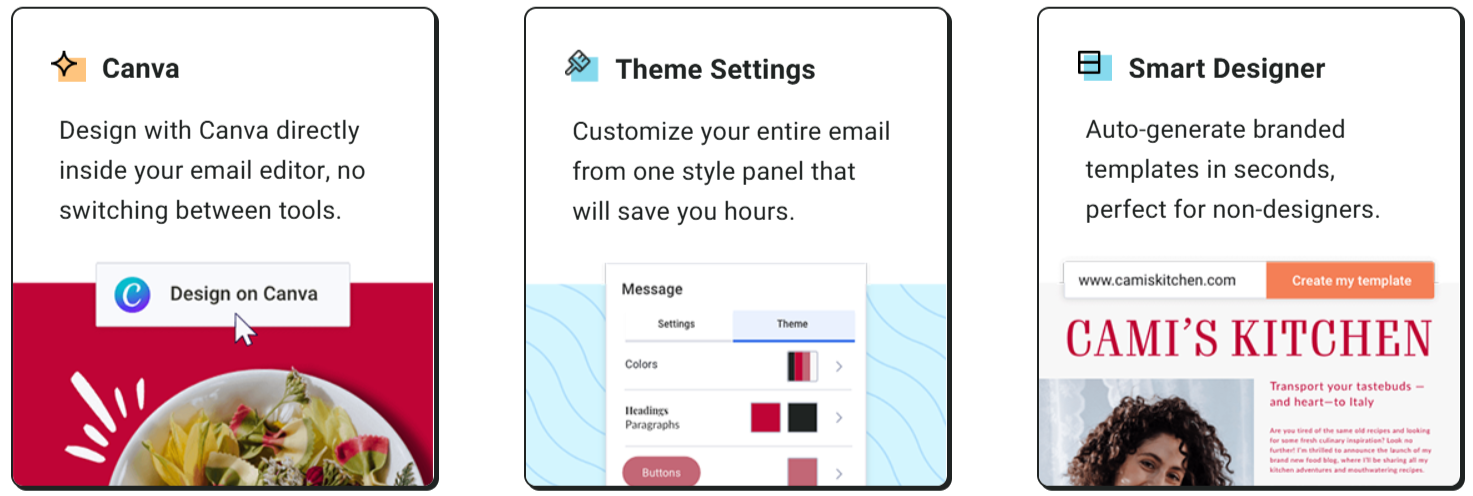
Canva Inside the Email Editor
AWeber now integrates Canva directly into its email editor.
That means you can work with Canva designs without constantly switching between separate tools.
For marketers who already use Canva for social posts, advertisements, presentations, or product graphics, this can make the email creation process much more convenient.
Theme Settings
Theme Settings allow you to control the overall appearance of an email from one place.
Instead of repeatedly changing fonts, colors, buttons, and other design elements, you can establish a consistent style and apply it across your emails.
This is especially useful for businesses that want their newsletters to maintain a consistent brand identity.
Smart Designer
Smart Designer can automatically generate branded email templates.
That can be useful if you know how you want your brand to look but don’t want to spend hours designing an email template from scratch.
Professional Images and Templates
AWeber also provides professional images and email templates that can speed up the design process.
Put all of these together and the platform becomes much more attractive to people who want professional-looking emails without needing a dedicated designer.
Does AWeber Use AI for More Than Just Writing?
Yes.
AI is now spread across several parts of the AWeber platform.
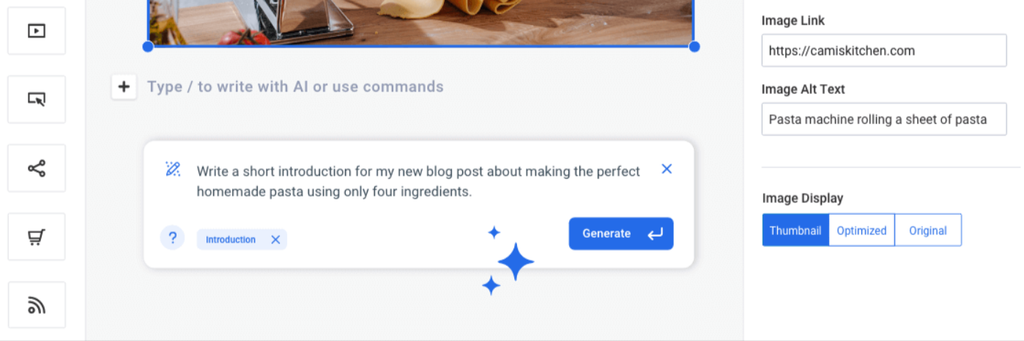
The current feature set includes an AI Subject Line Assistant, AI Writing Assistant, Newsletter Assistant, AI Landing Page Builder, and AI Signup Form Builder.
The subject line assistant can help generate ideas designed to make emails more noticeable.
The AI Writing Assistant can help create or improve email copy when you don’t want to start from a blank screen.
The Newsletter Assistant goes further by generating newsletter drafts automatically.
AWeber’s AI tools also extend into landing pages and signup forms.
That makes the AI functionality more useful than simply having a chatbot inside the email editor.
For a small business owner, the practical benefit is time.
You still control the strategy, offer, audience, and final message, but AI can reduce the time spent creating the first draft.
That’s a meaningful part of the modern AWeber review 2026 because the platform is increasingly combining traditional email marketing with AI-assisted workflows.
Can You Edit Emails From Your Phone?
AWeber also offers a mobile editor.
This can be useful when you need to create or edit an email while you’re away from your computer.
For example, a business running a limited-time offer might need to make a quick change before sending a campaign.
The mobile editor is designed to make that possible without requiring the entire campaign-building process to happen on a desktop.
AWeber also includes link previews, which can automatically turn links into more visual content inside emails.
These may seem like small features, but they can make everyday email creation considerably faster.
Can AWeber Automate Your Entire Follow-Up Process?
This is one of the areas where AWeber becomes much more interesting.
You can create automated email sequences that guide subscribers through a predefined journey.
For example:
Day 1: Welcome email
Day 2: Useful educational content
Day 4: Case study
Day 6: Product or service explanation
Day 8: Offer
Once the workflow is configured, the emails can be delivered automatically.
But AWeber also supports behavioral automation.
That means your automation can respond to what subscribers actually do rather than simply following a fixed calendar.
For example, someone who clicks a particular product link could receive a more relevant follow-up.
Someone who doesn’t engage could receive different content.
This makes AWeber more capable than a basic autoresponder system.
Can AWeber Automatically Send Your Blog Content?
Yes.
AWeber supports RSS-triggered emails.
This is useful if you regularly publish blog posts, podcasts, YouTube videos, or other RSS-enabled content.
Instead of manually creating a new email every time something is published, you can set up an automated process that sends new content to subscribers.
For a content-driven business, this can remove a surprisingly repetitive task.
Imagine publishing a new blog post and having your email marketing system automatically distribute it to your subscribers.
That is particularly useful for bloggers, publishers, and businesses that consistently create content.
Can You Personalize Emails for Different Subscribers?
Yes.
AWeber supports dynamic content, tagging, and segmentation.
These features allow you to make emails more relevant to different groups of subscribers.
For example, an ecommerce business could tag subscribers based on the products they interact with.
A marketing agency could segment subscribers based on their interests.
A course creator could separate new subscribers from existing customers.
Instead of sending exactly the same message to everyone, you can create more targeted communication.
This becomes increasingly important as your list grows.
Does AWeber Have Split Testing?
Yes.
AWeber’s current feature comparison includes email split testing, which can be useful when you want to test different versions of your campaigns.
You could test different:
- Subject lines
- Email content
- Calls to action
- Offers
- Campaign approaches
The purpose is simple: instead of guessing what works, you can use actual campaign performance to make better decisions.
For marketers running regular campaigns, this can become an important part of optimization.
Does AWeber Have Good Deliverability Features?
Deliverability is one of those things you don’t notice when it works, but it becomes extremely important when it doesn’t.
AWeber highlights its in-house deliverability team and infrastructure as part of its effort to help emails reach subscriber inboxes.
The platform also lists detailed deliverability reporting among its higher-level features.
That can give marketers more information about how their campaigns are performing from a delivery perspective.
Of course, no email platform can guarantee that every message will reach the inbox.
Your sender reputation, content, list quality, authentication, engagement, and sending practices still matter.
Can You Build Landing Pages Inside AWeber?
Yes.
AWeber includes landing page tools for lead generation, promotions, products, and other marketing campaigns.
You can use landing pages for:
- Lead magnets
- Newsletter subscriptions
- Webinars
- Product launches
- Digital products
- Service inquiries
- Special offers
AWeber’s current feature set also includes video landing pages, Google Analytics, domain connection, Facebook Pixel tracking, and ecommerce functionality on applicable plans.
That means an AWeber landing page can do more than simply collect an email address.
For example:
Meta Ads → AWeber Landing Page → Signup → Email Automation
That’s a useful setup for a small business that wants to keep its lead-generation system relatively simple.
And if your website is on WordPress, you can connect AWeber with it rather than rebuilding your website.
For example, if you’re researching Hostinger WordPress hosting for your website, your eventual setup could be:
WordPress Website + AWeber + Meta Ads
That gives you separate tools for the website, traffic generation, and email follow-up.
Can You Sell Products and Services Through AWeber?
Yes.
AWeber has an ecommerce component that lets users sell products and services through its platform.
The current feature set includes subscriptions and payment plans, sales tracking, and purchase tagging.
This can be particularly useful for creators and small businesses selling digital products.
For example, you could create a landing page for an ebook, collect payment, and then use purchase information to tag the customer.
That tag can then be used in future email automation.
This creates a much more connected workflow:
Visitor → Lead → Customer → Repeat Customer
AWeber’s current pricing page also lists ecommerce transaction fees of 0.6% on Plus and 1.0% on Lite, in addition to applicable payment processor fees.
What About Web Push Notifications?
One of the newer features that deserves attention is web push notifications.
AWeber’s current pricing page lists functionality for collecting web push subscribers, sending messages, and accessing analytics.
This gives businesses another way to communicate with visitors beyond email.
It could be useful for:
- Publishers
- Ecommerce stores
- Content websites
- Bloggers
- Businesses with frequent promotions
It also shows how AWeber is expanding beyond traditional email marketing.
Can AWeber Help You Build a Link-in-Bio Page?
AWeber’s current platform navigation also includes a Link in Bio page feature.
This is aimed at creators and businesses that want a simple page containing multiple links from one shareable URL.
For someone promoting content through Instagram, YouTube, or other social platforms, a link-in-bio page can act as a central destination.
You can use it to direct visitors toward your website, newsletter, products, landing pages, or other important resources.
What Is AWeber MCP and How Does It Work With AI?
AWeber has also introduced AWeber MCP, which is designed to let users interact with their email marketing through AI assistants such as ChatGPT or Claude.
The idea is interesting.
Instead of constantly navigating through dashboards and reports, you can interact with your email marketing using conversational instructions.
AWeber says users can ask about opens and clicks, create a welcome series, schedule broadcasts, and get recommendations.
This moves AI beyond simply generating email copy.
It starts becoming an interface for actually working with your marketing data and campaigns.
As this is a newer capability, check AWeber’s current documentation for supported actions and availability before building a workflow around it.
Can AWeber Connect With Other Marketing Tools?
Yes.
AWeber supports integrations with popular platforms including:
- WordPress
- Shopify
- WooCommerce
- PayPal
- Zapier
- And hundreds of other integrations
This matters because most businesses already use several tools.
For example, your setup could be:
Website → AWeber → Ecommerce → Analytics → Advertising
AWeber doesn’t have to replace everything.
It can become the email and subscriber-management layer inside your existing technology stack.
If you’re researching Hostinger pricing 2026 for your website, for example, the hosting decision and email marketing decision can be treated separately. Your website can run on your preferred hosting platform while AWeber handles email marketing.
AWeber Pricing 2026: What Are You Actually Paying For?
Pricing is one of the most important parts of this AWeber review 2026 because the cost changes as your subscriber list grows.
AWeber’s current pricing structure includes:
- Free
- Lite
- Plus
- Unlimited
- Done For You
The current pricing page shows annual starting prices of $12.49/month for Lite and $19.99/month for Plus at the 0–500 subscriber level. The page currently lists monthly pricing of $15/month for Lite and $30/month for Plus at 500 subscribers.
The exact price increases as your subscriber count grows.
For example, the current pricing table lists Lite at $35/month for 2,500 subscribers and $60/month for 5,000 subscribers.
Plus is listed at $55/month for 2,500 subscribers and $90/month for 5,000 subscribers.
AWeber also offers a Free plan with up to 500 subscribers and 3,000 emails per month.
So when looking at AWeber pricing 2026, don’t focus only on the starting price.
Look at what happens when your list grows.
AWeber Free
The Free plan is aimed at people who are just getting started.
It currently supports up to 500 subscribers and 3,000 email sends per month.
It includes one list profile and one workflow automation.
That makes it a useful way to learn the platform without immediately committing to a subscription.
AWeber Lite
Lite is designed for creators and businesses that need more than the basic plan.
At the 0–500 subscriber level, the current pricing page lists Lite at $12.49/month when billed annually or $15/month when billed monthly.
The plan includes:
- 1 email list
- 3 landing pages
- 3 email automations
- 3 users
- 1 custom segment
- 24/7 support
- Advanced message analytics
AWeber Plus
Plus is where the platform becomes considerably more capable.
The current annual starting price is $19.99/month for the 0–500 subscriber tier.
Plus includes:
- Unlimited email lists
- Unlimited landing pages
- Unlimited email automations
- Unlimited custom segments
- Unlimited users
- Priority 24/7 support
- Advanced reporting and analytics
- Advanced landing page features
- Sales tracking
- Lower ecommerce transaction fees
- AWeber branding removal
The current monthly price at 500 subscribers is $30.
AWeber Unlimited
AWeber also has an Unlimited option for larger operations.
Businesses with very large subscriber lists can contact AWeber for high-volume pricing.
The current pricing page lists tiers up to 150,000 subscribers, while businesses with more than 100,000 subscribers are directed to contact AWeber.
AWeber Done For You
This is another feature that deserves attention.
AWeber’s Done For You service is aimed at businesses that don’t want to build their email marketing system themselves.
The current offer includes an email marketing setup built by AWeber experts, including emails, landing pages, workflows, integrations, branding, signup forms, a welcome series, newsletter drafts, a 1:1 setup call, and 30 days of unlimited edits.
The current pricing page shows this service at $20/month billed annually plus a $79 setup fee as part of its current offer.
For a busy business owner, that can be an interesting alternative to spending hours learning the platform.
Which AWeber Plan Should You Start With?
This is another important point in our AWeber review 2026.
If you’re just starting, Free gives you an opportunity to learn the platform.
If you’re building a small business or creator brand and need more landing pages and automation, Lite may be enough.
If email marketing is already an important part of your business, Plus provides a much larger feature set.
And if you’re operating at very high volume, AWeber can discuss a larger custom setup.
The important point is that you don’t need to start with the most expensive option.
Choose based on what you’re actually using today.
Also remember that your other business costs are separate.
For example, if you are checking Hostinger renewal price for your website, that is a hosting expense and doesn’t need to be bundled into your email marketing decision.
AWeber vs Systeme.io: Email Specialist or All-in-One Platform?
AWeber and Systeme.io overlap, but their philosophies are different.
AWeber is heavily centered around email marketing.
Systeme.io is designed as a broader all-in-one online business platform that combines email, funnels, automation, websites, courses, and other business functions.
So if email is the center of your marketing strategy, AWeber’s focused approach can be attractive.
If you want one platform to handle a wider range of online-business functions, Systeme.io may be worth investigating.
The right choice depends on how much of your business you want to manage inside one platform.
AWeber vs Other Email Marketing Platforms
AWeber also competes with platforms such as Kit, MailerLite, Moosend, Sender, GetResponse, and ActiveCampaign.
Some are designed primarily for creators.
Some focus heavily on advanced automation.
Others combine email with ecommerce, CRM, funnels, or broader marketing features.
This means feature count alone isn’t a useful way to choose.
Instead, look at your actual workflow.
Do you need simple newsletters?
Do you need behavioral automation?
Do you need landing pages?
Do you sell products?
Do you need web push?
Do you need advanced segmentation?
Do you want AI assistance?
Once you answer those questions, it becomes much easier to compare platforms.
What I Like About AWeber
There are several things that stand out positively in this AWeber review 2026.
A Strong Email Foundation
Email remains at the center of the platform, which makes the overall product relatively easy to understand.
Plenty of Automation
You get traditional automated sequences as well as behavioral automation.
Useful AI Tools
AI isn’t limited to one writing feature. It appears across subject lines, writing, newsletters, landing pages, and signup forms.
Good Content Creation Tools
Canva integration, Smart Designer, templates, professional images, and Theme Settings make it easier to produce professional-looking emails.
Ecommerce Features
You can sell products and services, support payment plans, track sales, and use purchase tagging.
Multiple Ways to Reach Your Audience
Email is still the main channel, but AWeber now also offers web push notifications and other audience-building features.
Strong Integration Options
Connections with WordPress, Shopify, WooCommerce, Facebook, PayPal, Zapier, and hundreds of other tools make it easier to fit AWeber into an existing marketing stack.
Where AWeber Could Be Better
AWeber isn’t necessarily the right choice for every business.
If you want a complete CRM, sophisticated sales pipeline, course platform, website builder, and business automation system in one product, you may want to look at broader all-in-one platforms.
Pricing also becomes more important as your subscriber list grows.
And advanced marketers should compare automation depth and segmentation capabilities against dedicated marketing automation platforms before committing.
None of this makes AWeber a bad choice.
It simply means the platform should be evaluated according to your own requirements.
Who Is AWeber Best Suited For?
AWeber can make sense for:
- Small businesses
- Creators
- Bloggers
- Coaches
- Consultants
- Freelancers
- Ecommerce businesses
- Newsletter publishers
- Marketing teams
It is particularly useful for people who want to build an audience they can communicate with directly instead of depending entirely on social media reach.
AWeber Makes Sense If…
You want email marketing to be a central part of your business.
You want automation without building an extremely complicated system.
You want landing pages and signup forms included.
You want ecommerce capabilities.
You want AI tools to speed up content creation.
You want web push as an additional communication channel.
You want a platform that can connect with the tools you already use.
You May Want Something Else If…
You want an all-in-one business platform with extensive CRM, sales, courses, funnels, and website capabilities.
You need very advanced enterprise-level automation.
Or you simply don’t need more than a basic newsletter tool.
In those cases, comparing alternatives before committing makes sense.
How I Would Start With AWeber
If you’re new to email marketing, don’t try to use every feature on day one.
Start with a simple system:
Step 1: Create your account.
Step 2: Create a signup form or landing page.
Step 3: Give visitors a useful reason to subscribe.
Step 4: Create a welcome email.
Step 5: Build a short automated sequence.
Step 6: Start sending useful content.
Step 7: Add segmentation once your list grows.
Step 8: Add ecommerce, behavioral automation, or web push when you actually need them.
If your website is built using an AI-based hosting or website-building workflow, you can also keep the two systems separate. For example, you might use Hostinger AI website builder for getting the website online and AWeber for the email marketing layer.
And if your website eventually needs more server resources, you can separately explore Hostinger cloud hosting without changing your email marketing system.
That flexibility is useful because your website and email platform don’t have to come from the same company.
AWeber Review 2026: The Bottom Line
After looking at the current feature set, AWeber is much more than a traditional newsletter platform.
You get email creation tools, AI assistance, automation, behavioral targeting, segmentation, landing pages, ecommerce, web push notifications, analytics, integrations, and tools designed to make everyday marketing work faster.
That doesn’t mean every business needs every feature.
But it does mean AWeber gives you plenty of room to start simple and gradually build a more sophisticated marketing system.
For creators and small businesses especially, that flexibility can be useful.
Final Thoughts: Is AWeber Worth Trying in 2026?
This AWeber review 2026 comes down to a fairly simple question: do you want a dedicated email marketing platform that can grow with your business?
If the answer is yes, AWeber is still worth putting on your shortlist.
You can start with the Free plan, create your first signup form, build a welcome sequence, and learn how your audience responds.
As your business grows, you can add segmentation, behavioral automation, ecommerce, advanced reporting, web push, and other features when they actually become useful.
That’s a sensible way to approach marketing software.
You don’t need to use every feature on day one. You simply need a platform that gives you the tools to move forward.
And that’s where AWeber has become considerably more interesting.
It has retained its focus on email while adding modern AI, automation, ecommerce, personalization, analytics, and audience-building features around it.
So if you’re looking for a practical email marketing platform that you can start small with and expand as your business grows, AWeber is definitely worth trying.
The best way to find out whether it fits your workflow is to actually use it.
Start with a small campaign, build a simple automation, and see how the platform feels in practice.
Frequently Asked Questions About AWeber
Is AWeber worth it in 2026?
AWeber is worth considering if you want email marketing, automation, landing pages, segmentation, ecommerce, analytics, and AI-assisted marketing tools in one platform.
Is AWeber free?
Yes. AWeber offers a Free plan for up to 500 subscribers and 3,000 email sends per month.
What is AWeber used for?
AWeber is used to build email lists, send newsletters, automate follow-ups, create landing pages, segment subscribers, track campaigns, and sell products and services.
Does AWeber have AI?
Yes. AWeber currently offers AI features for subject lines, email writing, newsletters, landing pages, and signup forms.
Does AWeber have behavioral automation?
Yes. AWeber supports behavioral automation that can respond to subscriber actions.
Can AWeber send blog posts automatically?
Yes. AWeber supports RSS-triggered emails, which can be used to automatically send new content to subscribers.
Can you sell products through AWeber?
Yes. AWeber includes ecommerce features for selling products and services, including subscriptions, payment plans, sales tracking, and purchase tagging.
Does AWeber have web push notifications?
Yes. AWeber’s current platform includes web push functionality for collecting subscribers, sending messages, and analytics.
Does AWeber integrate with WordPress?
Yes. AWeber lists WordPress integration along with Shopify, WooCommerce, Facebook, PayPal, Zapier, and hundreds of other integrations.
Is AWeber better than Systeme.io?
The two platforms focus on somewhat different needs. AWeber is centered around email marketing, while Systeme.io provides a broader all-in-one online business platform.
Which AWeber plan should a beginner use?
A beginner can start with the Free plan and upgrade when additional subscribers, automations, landing pages, or other features become necessary.

Author Profile
Digital marketer and founder of SuperBuzz Media, with hands-on experience in performance marketing, lead generation, WordPress, AI automation, and digital marketing tools. I share practical insights, real-world experiences, and tool reviews to help businesses make smarter digital decisions.
Pingback: Systeme.io Review 2026: Can One Tool Really Run Your Online Business? - SuperBuzz Media Company